chkycoming soon
Stop guessing the key.
coming soonPlanned price: US$19, one time
AU / VST3Macyour sound passes through untouched
One key. One number.
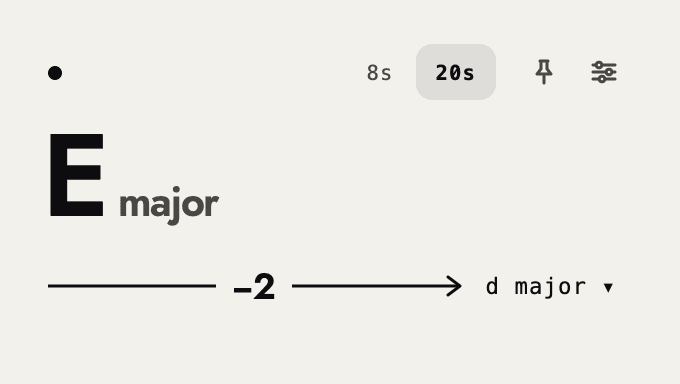
Put chky on a track and it shows the key of what's playing, in big letters. Pick the key you want to fit, and it shows one number: how many semitones to pitch the sound. It only shows the number. Your sound passes through as it is.
features
- listen
- Listens to whatever plays on its track and shows the key. Works on audio tracks, and after an instrument.
- target
- Pick the key to fit. chky shows how many semitones to pitch the sound, the shorter way: −2, not +10.
- steady
- One stray reading doesn't change the key. It changes when the new answer comes back. When the sound stops, the key clears.
- other keys
- Keys made of the same notes (C major and A minor, for example) and the next closest keys open with one press.
- 8s / 20s
- Listens to the last 8 or the last 20 seconds. Switch between them.
- hold
- Pins the key so it stops changing.
- sound
- Passes through untouched. chky shows the number; it does not change the pitch.
requirements
- format
- AU and VST3.
- system
- Mac.
faq
- What is chky?
- An AU / VST3 plugin for Mac. It listens to what's playing on its track and shows the key, and how many semitones to pitch it to fit a key you pick. The name comes from “check key”.
- When will it be out?
- There is no date yet. Leave your email above and we'll tell you when it's ready.
- Does it change the pitch?
- No. chky only shows the number. Move the pitch yourself, in your sampler or the clip's settings. The audio passes through chky as it is.
- Why is it 0 between C major and A minor?
- They use the same seven notes, so a sound in one already fits the other. There is nothing to move.
- What will you email me?
- First, one email to confirm your address. Then an email when chky is ready, along with news about new tools and music from nokbeats. You can unsubscribe anytime.