phrz pluginnew
find what you wouldn't make on purpose. now in your DAW.
$59one-time payment
Mac (macOS 13.4 or later) · Windows 10/11 / VST3 and Audio Unit (Mac)includes pro for phrz on the web
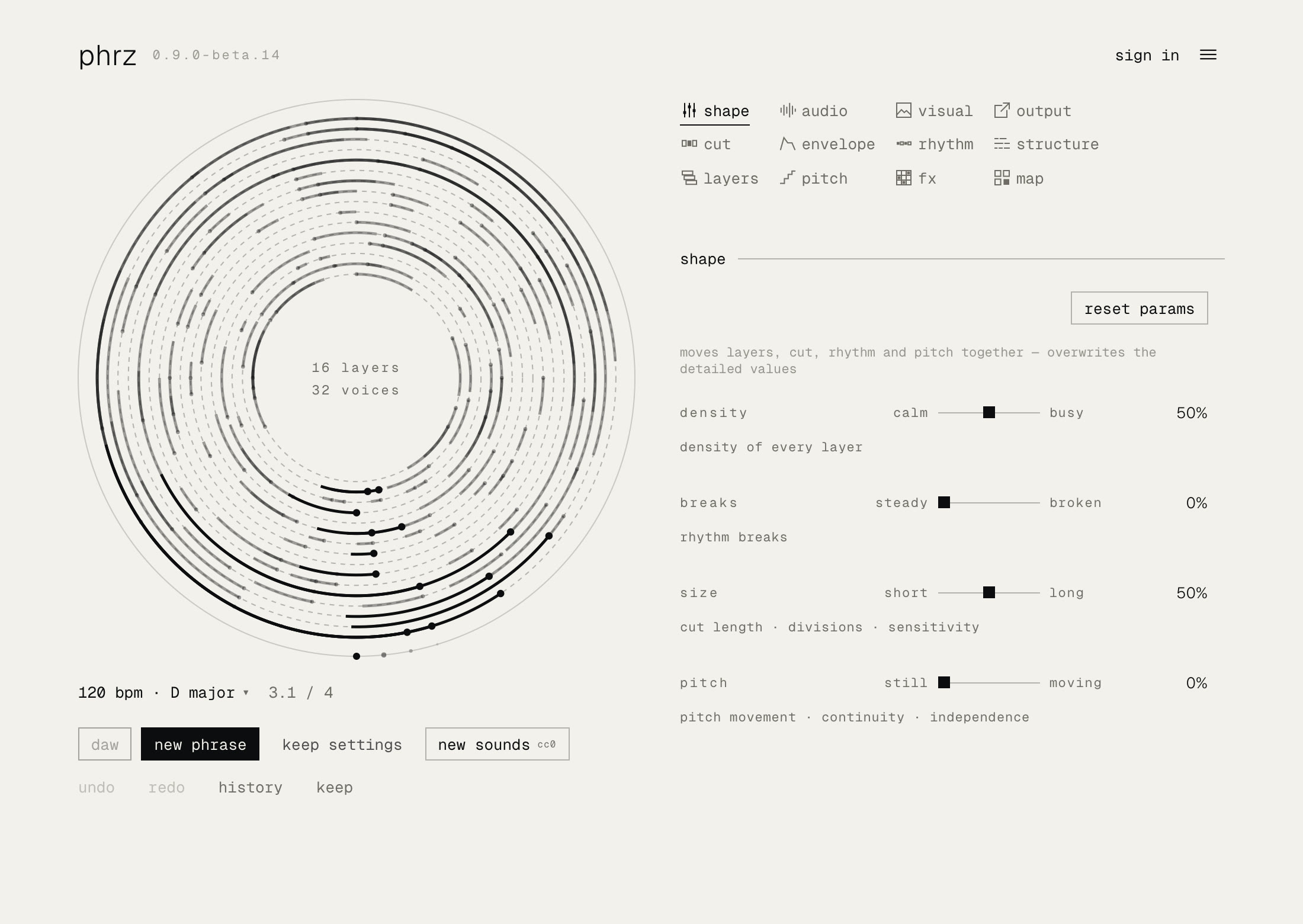
phrz is a loop slicer: it slices your loops and samples at random, then rearranges the pieces into phrases.
you don't place the cuts by hand. the order, the sounds, how the picture is cut: phrz leaves all of it to chance. all you do is press, listen and keep.
chopped and placed at random
phrz auto-chops up to 24 samples at random points and places the pieces at random. samples in different keys are fine: phrz brings the pieces into key with each other.
- 01
drop in
add your samples, or pull some in with new sounds.
- 02
chop and place
phrz cuts at random and lines the pieces up in key.
- 03
pick
new phrase for the next idea. keep the ones you like.
the more samples, the better it gets
press new sounds and phrz randomizes your samples: it pulls sounds from your own folders, a CC0 library or pure, the tones built into phrz, and draws a fresh phrase with them. hold the layers you like to keep their sound.
a different phrase with every press
flip your samples. dig out the loops you never used and press: phrz slices them at random and lines the pieces up as a new phrase. keep what you like and roll the rest again.
the picture gets cut up too
add your own images or video. export as MP4.






source: an ink video (Pexels)
straight into the song
plays in your DAW's tempo and key, mixes over up to 24 outputs, and drags onto tracks as WAV.
switch phrases from a MIDI clip
notes in a MIDI clip call a keep or a new phrase. map the knobs to your controller, and the moves stay as automation.
phrz runs in your browser too
the plugin comes with pro for phrz web.
phrz plugin in 52 seconds
featured in
beesic · DTM news #44 · 2026.10.30
- Rekkerd2026-44 Round-Up: Free effects & synths, granular sampling, DAW utilities & more↗
Rekkerd · 2026.10.30
get phrz plugin
phrz plugin
every feature, one-time payment. includes pro for phrz on the web.
$59
features
- tempo
- follows the DAW's tempo
- key
- set the key in phrz. samples in different keys can be mixed
- layers
- up to 24
- new sounds
- random sounds from a CC0 library, your own folders (as many as you like) or pure, the tones built into phrz
- outputs
- a stereo output per layer (up to 24), plus the full mix
- keep
- also from a MIDI note
- drag
- onto tracks as WAV
- export
- stems, MP4 (picture and sound. on Mac, MP4 needs macOS 15 or later)
- visual
- images and video, on a second screen if you like
- MIDI notes
- call keeps, new phrase, re-cut and more from notes (map in the guide)
- controller
- map the knobs with your DAW's MIDI mapping. recorded as automation
compatibility
- mac
- macOS 13.4 or later · Apple silicon and Intel (universal) · VST3 and Audio Unit (AUv2)
- windows
- Windows 10 / 11 (64-bit) · VST3 · needs WebView2
- sounds
- WAV, AIFF, MP3, M4A, FLAC, OGG and more
which format to load
- Ableton Live
- VST3
- Logic Pro
- Audio Unit
- other DAWs
- VST3 or Audio Unit, whichever your DAW supports
made with phrz
an album made in phrz web
Fragments Becoming Tapes?
questions
- is phrz a sample slicer? do I choose the cuts?
- it's a loop slicer that does the cutting for you: automatic sample chopping at random points. phrz rearranges the pieces into a phrase in your session's tempo and key. you don't place the cuts by hand, so it isn't a manual sample chopper. press new phrase for a different cut.
- can I use it to flip samples?
- yes. drop in a loop you never used and press new phrase: phrz slices it at random and puts the pieces back as a new phrase, a quick sample flip. keep what you like. with new sounds it also works as a random sampler, pulling samples at random from your own folders, a CC0 library or pure.
- is it the same as phrz on the web?
- they are separate products. the plugin comes with pro for phrz web.
- do I need my own samples?
- no. phrz starts with CC0 sounds.
- does it run on Windows?
- Yes. It runs on Windows 10/11 (64-bit), with VST3 only. WebView2 is required.
- can I get a refund?
Try phrz on the web first. It's free, and you can hear what phrz does with your own samples.
If the plugin won't open or makes no sound on your computer or in your DAW, email support@nokbeats.com within 14 days of purchase. We'll help you get it running. If we can't, we'll refund you.
We refund the plugin; the included Web pro stays yours. The plugin license is revoked after a refund.
- how do I start using it after buying?
If you bought without signing in: after payment, your code appears on screen and is sent to you by email. Sign in (you can create an account there), enter the code, and the download unlocks. Install what you downloaded (run the installer on Mac; on Windows, put phrz.vst3 in the VST3 folder), open phrz in your DAW and sign in with the same account.
If you bought while signed in, you don't need a code: download it and follow the same steps.
- does the plugin send any data?
- crash reports (where it crashed, version, OS, DAW name) and how you use it (which buttons were pressed, and so on). never your sounds or file names. both can be turned off in settings at any time. privacy policy (Japanese)